Archive for the ‘Apple’ Category

Why the Apple TV still sucks

Thursday, February 14th, 2008

apple-tv-take-2-take-two-top.jpg

If you follow me on Twitter, then you probably saw that I’m not happy with the Apple TV 2. While I couldn’t wait to get the Apple TV, I wait with baited breath for every update to see if I will actually get the main feature that I bought the stupid thing for. No it’s not the video, the quality just can’t compare to Blu-ray so I’m not interested, the thing I really wanted, was a way to enjoyable look at my photos on my 60-inch plasma. Sure my TV has a memory card slot, as does my Blu-ray player, but I said enjoyably. This hasn’t been the case for the Apple TV in the past and it’s not the case with that latest update. To sum up my issue with the Apple TV’s photo experience, I’d like to share a little IM chat I had with my friend Tyler from Format War Central.

Tyler: so the apple tv still sucks?
me: I’m just bitter that they didn’t fix my biggest grip about the photos
Tyler: what do you mean?
me: go to photos on your iphone and select an album, you see thumbnails of all your photos right?
Tyler: yeah
me: If you hit play you can watch a slide show right?
me: how often do you watch the slide show and how often do you just thumb through your pics?
Tyler: never watch a slide show
me: well on the ATV, you can only watch a slide show
Tyler: thats retarded
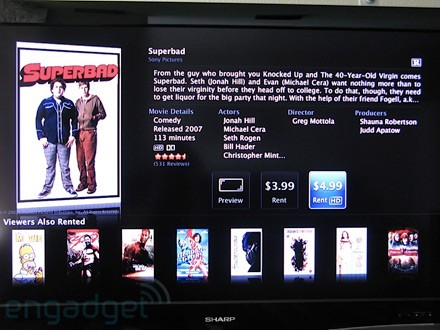
me: so even though you can browse all your movies and tv shows with thumbnails filling the screen, you can’t look at your pictures with that UI
which makes it useless

So how about it Apple? Can we please browse our own photos like we’ve been able to in iPhoto, the original iPod Photo and the iPhone? And just like we can browse movies and TV shows on the Apple tV? Is that really too much to ask?

Love my MacBook Air

Monday, February 11th, 2008

MBA-um32w.jpg

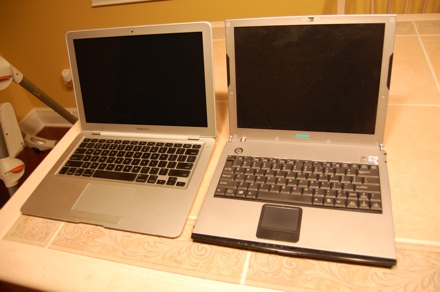
I’ve always loved small laptops and as silly as some think it is, the thinner the better. The MacBook Air is my third ultra-portable laptop and so far my favorite for a few reasons that MBA haters will find funny. The battery lasts longer, it is thinner and it runs OS X! The third is the most important of course. The other great thing about the MBA when compared to my older laptops is the keyboard and the screen. Not only does it feature full sized versions of both, but the keys feel good compared to my old um32w and about the same as my m300, but not as cramped. The MBA costs about the same price as my other two as well, but lets hope it lasts longer than my um32w which died after 14 months, with a sporadic power off issue.

The only thing I’m quickly learning to dislike about my MBA is the solo USB port, I’ve already purchased two hubs which will help out, but it would’ve been really nice to have two. So far my favorite thing is the way the MBA looks much thinner than it really is. The thickest part is .76-inches thick, which doesn’t seem much thinner than my um32w which was .8, but when you put them next to each other the MBA sure does look smaller.

In the end I recognize the MBA isn’t for everyone, but it’s for me. I just wish Apple would make a 13-inch MacBook Pro, ’cause I think this would help cut down on the MBA hate, who had their hopes up for a replacement to the 12-inch PowerBook.

Check out all the pictures comparing my um32w to my MacBook Air.

If Apple won’t make a Mac, I’ll do it myself

Monday, January 28th, 2008

Although I grew up on Windows, like most who are on the front of the curve I run OS X now. As much as I love OS X and Apple hardware, I’m very annoyed that Apple doesn’t make a Mac anymore. Sure they have the MacBook Pro, the Mac Pro and the iMac, but what if you want to be able to upgrade your hard drive or video card? Or maybe you want a Blu-ray drive. Apple only has the Mac Pro and while it is an awesome machine, I don’t have much use for a $3k 8 core Xeon powered monster.

I’m sick of compromising portability and power with my MacBook Pro, but now that Apple has the MacBook Air, I can go back to having two computers and rather trying to have one that does it all. This of course means my MBP is gone and I need a good desktop. If I didn’t already have a 20-inch cinema display and the iMac had a eSATA port, I’d just get an 20-inch iMac, but instead I think I’ll build a hackintosh. The funny part is I really don’t want to. While there was a time when I wouldn’t dream of buying a computer that I didn’t build, now I would rather do just about anything than to build a computer myself. I really don’t feel like I have much of a choice and after my MBA is delivered and my MBP is gone, I’ll head down the path. Who knows, maybe I’ll have some fun along the way.

The MacBook Air is perfect for me

Wednesday, January 16th, 2008

The funny thing about Apple is although their products are usually very successful, there always seem to be a lot of people disappointed with their announcements. I’m not sure how Apple got to the point where everyone thought they could be everything to everyone, or if those vocal online are just trying to counter all the fanboys, but either way there is plenty of banter going both ways.

My friend Kevin and I have never seen eye to eye on the industry name for Apple’s latest MacBook. Kevin thinks that an Ultra-portable has to be more portable than a laptop can be, and I side with the marketing people in that it’s as portable as a laptop can be. So for me the Air is as close to perfect as any laptop I’ve ever had — and I love ultra-portable laptops. Although I wrote perfect in the subject of this post, I didn’t really mean it — so sue me. It would be perfect if it had more USB ports, built in 3g, and a replaceable battery — oh, and costs half as much, but hey. Despite not being perfect, it’s the closest I’ve seen because it’s super small and light, has a full size keyboard, boasts 5 hour battery, — I’ll believe it when I see it — runs OSX, and more powerful then just about any laptop I’ve had (besides my MacBook Pro). So as you’d expect, I pre-ordered one already. We’ll see if it lives up to my expectations, but so far the only Apple product that didn’t is the Apple TV — and there’s hope for that yet.

Newsgator.com optimized for the iPhone

Tuesday, July 24th, 2007

Shortly after I fell in love with NetworkNewsWire, I learned to love Newsgator for no other reason than so I don’t have to read the same news twice. The biggest thing I had to give up when I got my iPhone was Newsgator Go! I have been using the mobile version of Newsgator.com on my iPhone and while it’s ok, anyone who has used it knows it doesn’t work that great on the iPhone. Now Newsgator has released a iPhone optimized version and I have to say they’ve done a great job. It’s really nice! Now if I could just get an equivalent to Google’s mail application, all would be right with the iPhone.

Why does the iPhone take so long to sync?

Saturday, July 21st, 2007

I have had a few devices that I’ve sync’d with my computer and it seems that the iPhone is the slowest of them all. It takes 7 minutes to sync everything but media. Then it only takes 2 minutes to sync my podcasts. Maybe it’s just me, but 9 minutes to sync — not including video or music — is too long, especially considering the amount of changes that were made.

**Update** The reason for my long sync was Office 2004, once I updated to the preview of Office 2008, my iPhone syncs really fast!

**2.0 Update** The first few times I synced after updating to 2.0 took forever, but just keep syncing, and eventually the “backing up iPhone” flys by like it did before.

The problem is the applications — every time you add new apps it has to back those up which takes forever and for whatever reason it seems to take longer when I install the apps via iTunes than when I use the iPhone’s app store.

iPhone and Gmail work around

Friday, July 6th, 2007

Two of my favorite things work terrible together. Gmail is the best web mail application, I can’t imagine email without it, but the lack of IMAP is a real bummer.

POP has always sucked when used to keep up with your mail in more than one place, and Gmail manages to make it worse by; not giving you enough control over what gets POP’d, not marking items as read when POP’d, and putting sent items in your inbox. So until Apple and Google get together to make a Google mail equivalent to Goog’s Java app, here is the work around I use.

First you need a good IMAP service provider, since just about everyone has an AIM account, just login to mail.aol.com and configure your mail. Then go to Gmail and create a filter that will forward just the mail you want to receive on your iPhone, to your AOL email address. Now from either Mail.app or directly from the iPhone, configure a new email account. Call it GMail and configure it just like Google instructs, but instead of using their POP server, use AOL’s IMAP (imap.aol.com) server (be sure to use Gmail’s SMTP server though). If you set it up in Mail.app and sync over, you’ll have to edit the SMTP settings on the iPhone manually, cause the settings don’t sync over correctly — it should be obvious what the problem is, just don’t forget the special port number.

The only down side of this method is that you have to mark any email that makes it to your iPhone as read twice. But the good part is that you can send messages from your iPhone that not only appear to come from your Gmail account, but they also show up on gmail.com as if you’d sent them from the website.

If you’re wondering why I just didn’t use Yahoo’s IMAP service, it’s cause the iPhone won’t let you configure a different SMTP server on an Yahoo account or a different from address. I thought about configuring the account manually, but I couldn’t figure out the settings. I even tried to sniff my iPhone’s traffic while it retrieved my Yahoo mail, I figured out the IMAP server IP, but I was not able to figure out the user name or the password since they were encrypted (I tried the ID and password I use to sign on to yahoo.com, no dice). If you know how to brute-force this let me know, I still have the TCP stream.

**Update** Yeah, Gmail adds IMAP support, so no more work arounds! But you can still use this if you want to make gmail push mail via Mobile Me.

The iPhone is so intuitive, even a baby can use it

Wednesday, July 4th, 2007

emma-iphone.jpg

The ultimate iPhone review

Tuesday, July 3rd, 2007

My friends Ryan and Chris at Engadget have written the most comprehensive iPhone review you could imagine. It it 13k words, so you may want to take it in short segments. Also here’s a mini review from yours truly.

Good
UI is fantastic, fast and couldn’t ask for anything more.
iPod, phone and photos functionality is fantastic.
www.apple.com/trailers/iphone is a great example of a great iPhone web application.
WiFi integration is unbelievable, it really does just work.

Bad
I love Gmail and like the review says “One Engadget editor called the Gmail integration “a crime against humanity”. Email in general is really bad.
Safari crashes and it doesn’t identify itself as a mobile browser, so it always tries to load the full page, which can be painful over Edge.

Conclusion
The iPhone is the best phone I’ve ever had, hands down, but I can’t wait for software updates to resolve the issues.

Caught in action on the front page of the St Pete Times

Monday, July 2nd, 2007

stpetetimesiphone-sm.jpg

I had tons of fun waiting in line for my iPhone — good thing since it wasn’t necessary to wait — and when they finally opened the doors, I was right up front taking pictures for Engadget’s live line coverage. In the process, I was standing behind the #1 iPhone customer (that’s me to the right) when the St Petersburg times took the picture for the front page of the Saturday June 30th edition. Definitely a fun experience.

Read (PDF)