Now that I’m a full blown Vista Media Center fanboy, it’s no surprised that I was able to finagle my way onto The Media Center Show. Ian and I recorded this about a month ago and it was a blast. We didn’t talk that much HD, mostly it was Home Automation (my new girlfriend) and why I switched from TiVo. Have a listen, if you don’t mind listening to me ramble on for an hour.
Archive for the ‘HDTV’ Category
I was on The Media Center Show
Thursday, July 31st, 2008Holly cheap VMC Extenders! $129!!
Wednesday, July 2nd, 2008I read on TGB over the weekend that Dell.com was offering the Linksys DMA2100 for $199. A few others got the bright idea to see what their Dell employee discount program price was, and when I used mine it was only $129! So of course I ordered two! Then as soon as I got the “out for delivery” tracking update, I put one on eBay for $189 which sold in a few hours. So now my guest room has access to all my HD content, and it only cost me ~$70!
The bad news is that Dell.com is already out of stock. Some are picking up DMA2200s for $149, but DVDs are so 20th Century. Luckily there are a few other 2100s on eBay for $189 so get ’em while they last.
If you wondering what the best Extender is, then maybe you haven’t seen my shootout on Engadget yet.
Skipping commercials with DVRMSTools, CableCARD edition
Friday, May 23rd, 2008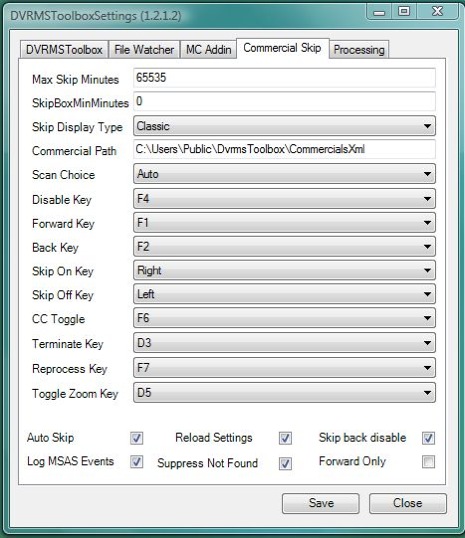
Before you get too excited, let me clear up the misleading title, because no, I haven’t figured out how to skip commercials on TV shows recorded via my ATI Digital Cable Tuner. But that doesn’t mean I don’t want to skip commercials with the rest of my recordings. It wasn’t as easy as I thought, and for whatever reason without some tweaking my VMC box was unstable. I can only assume this was caused by DVRMSToolbox trying to analyze shows that were copy protected, but either way, why even waste cpu cycles if it isn’t possible?
Lets start from the beginning though. Ever since my first DVR (ReplayTV 5040), I fell in love with automatic commercial skipping, and while 30 second skip works pretty good, there’s nothing like skipping commercials without ever touching a remote. I’ve tried both DVRMToolbox and Lifextender and while Lifextender was super easy to install, by design it edits the files, so if it mis-marks a commercial, it’s fatal. And over the past few weeks it has deleting one too many scenes from my favorite show, so it’s out. This brought me back to DVRMSToolbox, which I started with first — really loved how it analyzes shows that are still recording — but thanks to the complex setup and a few issues, I quickly gave up on it. But now I finally have those worked out, so I’m going to share them here. First starters, here’s how you get started with DVRMSToolbox commercial skipping (BTW, use Comskip, it’s free).
There are two tricks to making DVRMSToolbox work well. One is to exclude it from scanning shows with no commercials and shows that are DRM’d. The other is to change the default skip keys that get in the way of normal VMC operation.
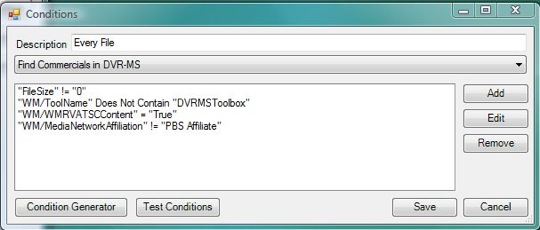
You can exclude on just about any piece of metadata that VMC stores about a show. At first I tried to edit the default Every File condition and say to skip any show recorded on a channel lower than 1032. But for whatever reason the channel number is a sting value instead of an integer, so you can’t use less than comparison! So I had to create two exclusions instead of one. One exclusion says any show not recorded with an ATSC tuner — this covers all the CableCARD tuner shows. The other rule says to exclude any show recorded from a PBS Affiliate — I love me some Nova, Nature and Frontline and they are already commercial free. This was pretty simple once I realized that ProcessContitionEditor was included with DVRSMSToolbox. I still had to dig around my recordings with DvrmsMetadataEditor to figure out what would work. So after a little trial and error I successfully excluded the shows I didn’t want to analyze.
Ok, but DVRMSToolbox and Lifextender both use the same commercial analyzing software (Show Analyzer $10 or Comskip which is free) to analyze the shows, so I expect it to be less than 100% accurate. So for starters, I choose to only mark commercials, and not delete them (the default). But I need a way to turn the automatic part off when things go wrong. By default this is the up and down keys on the remote, the problem is that those keys are already used when you overlay a menu or the guide when playing back recorded TV and since the plug-in isn’t smart enough to know what you want to do. So now I was off hunting for keys on the remote that don’t do anything when watching recorded TV, so I could use them instead. After some troubleshooting, I ended up with the Enter right and left Clear buttons. I setup left to disable automatic skip, and right to turn it back on — I also set the rest of the keys to F-keys so they wouldn’t get in the way. Update **Right and left ended up working better than enter and clear since the only time you use them while watching recorded TV is when the guide is up and you want to see what is on later, in those cases I just hit stop first.**
So now I have automatic commercial skipping on the majority of my shows, and I can turn it off and on whenever I want, I can start saving time. And when you consider the 1 second it used to take me to hit the 30 second skip button each time, compared to the 3 hours it took me to figure this out, I should break even on time in about 3 years!
Why the ZeeVee could be so cool
Thursday, May 1st, 2008The embargoed lifted this morning on a device I’ve been waiting since I discovered HD about 4 years ago — well almost. As long as I can remember, we’ve had RF modulators to make our lives simple, I remember my original Atari had one, you just plugged it inline with your coax going into your TV and you were off enjoying games. Of course NTSC RF-modulators have pretty bad picture quality and most game consoles today don’t use them, but they are still very useful for sending TV around your house on the existing coax. The problem is that if you think SD quality of RF-modulators is bad in the SD world, don’t even try to compare it to HD.
But finally the first consumer QAM RF-modulator is coming. Why is this so cool? Well lets say you want to watch your HD TiVo in every room of your house, but don’t want to buy another TiVo or pay the monthly fee. You could connect a device like this — but with component inputs — to your TiVo and then in any room of the house tune to channel 3 and now you’ll have HD with AC3 sound. You could even watch it on every TV in the house at the same time.
But lets take it to the next level, you could have a few of these and put all your gear in same room and then use the existing coax in the house to watch whatever you want on any TV you want. Blu-ray is on channel 3, HD TiVo on 4, VMC on 5 etc. Sure you can do this now, but it requires you to run expensive cables to each TV in the house and have devices to receive the signal at each TV. Not to mention have an expensive matrix switch and remotes to control it.
The biggest problem with the Zv now is that it only accepts VGA input and works with QAM instead of ATSC. Although many TVs have QAM tuners, the number isn’t nearly as many as those that have ATSC — it’s required by law after all. But the lack of component input and the lack of audio inputs other than USB is the real kicker. This makes the box unable to do exactly what I want it to do, but I’m sure what I’m after wont’ be far behind.
It’s official, Vista Media Center is so much better than TiVo
Tuesday, April 29th, 2008Before I get into the good stuff that backs up my opinion, let me give you some background. I’ve used Windows my entire life and although I preferred DOS to Windows 3.1, I’ve always been comfortable with Windows. When I really started getting into computers around 2000, I started to explore Linux and in the process of using Linux on my laptop (Gentoo) for years, I started to despise many things about the way Microsoft conducted its business and because of the fact that the UI didn’t seem to keep up with the times — ie, Vista has almost the same task bar as Windows 95. The irony of course is that I earn my living as an MCSE, so while I still don’t prefer Windows on my computers, I recognize that there are a few problems, like corporate email, that Microsoft simply has the best solution for. As for TiVo, my first DVR was a ReplayTV, but after I discovered HDTV 2003, I was quick to pick up a DirecTiVo HD for the low low price of $1000. So having been anti-Microsoft for a few years and a TiVo fanboy for almost five, enjoying a MS product so much more than TiVo, feels very backward to me.
Price
Believe it or not, TiVo cost me much more than my Vista Media Center PC with CableCARD. Of course this isn’t apples to apples, and I owned the more expensive version of the HD TiVo, but looking back I had $2302 invested for a two room system with 750GB of storage over 2 years. While at the same time VMC cost me $1900 — but that includes a Blu-ray drive and software. Of course if you were willing to settle for the two TiVo HDs, then you could get a two room setup for $1100. The big difference between the two in price is the service, TiVo gets $300, per box, for three years, Microsoft doesn’t charge for guide data at all, no matter how many TVs you have.
Multiroom
The multiroom capabilities of Vista Media Center are easily the biggest upgrade for me over TiVo. The up front cost to add a room is $250 for both, but again TiVo will cost you an additional $300 every three years. But price isn’t everything and the reason why VMC still out paces TiVo is because TiVo can’t stream shows between units and it can’t combine the tuners from all the TiVos in the house to automatically resolve recording conflicts. Of course with the TiVo you get another two tuners for every one you add, but I don’t think most people need as many tuners as they need ways to watch enjoy content, so the added $7 a month, plus CableCARD rental fees, just aren’t worth it.
Pictures and Music
Over the past few years I’ve had about four devices that would allow me to look at my photos and listen to my music collection on my HDTV, and while they’ve all been pretty good at music, pictures seem to be tricky. The TiVo isn’t bad at pictures, but it isn’t great — the worst part is the super small thumbnails and the TiVo Desktop that must run on your computer and who’s OS X version won’t serve up HD pictures. The VMC picture and music experience isn’t perfect, but it’s the best I’ve tried. All I had to do was copy my iPhoto Originals and iTunes Library folders over to corresponding folders on the VMC, and I was enjoying my content. The biggest bummer is that a lot of metadata doesn’t make it over, but if you really want a truely seamless experience, you can pick up MCE Tunes. But even without it, I find myself listening to music and browsing through my pictures more than ever and that includes with my Apple TV — but I will say that the music experience on the ATV is better, but without the rest of the cool stuff on one box it isn’t worth switching inputs.
Bonus
If I wanted to list all the things that VMC could do with add-ons and registry hacks that TiVo can’t — like play Blu-ray movies — I’d never have time to do anything else. Seriously, the sky is the limit and as hard as it might be for some to believe, Microsoft’s open architecture and development kit, really makes it easy for anyone to make VMC do whatever you want. Of course when you consider the amount of time it takes to set everything up — assuming you don’t buy a Nieveus or the like — all the bonus features you forfiet on the TiVo, you can almost be made up for with ease of setup.
DVR
For me at least, the main purpose of switching was to have a better DVR expereince, and while there are some die hard TiVo fans who will refuse to believe this, Vista Media Center offers the best DVR exerience availble today. But I don’t mean to say it is perfect, in fact there are few things that Microsoft can learn from TiVo, but there are more things TiVo can learn.
The Good
- The list of recorded shows is so much more enjoyable than TiVo, sure thumbnails aren’t super useful, but the vertical view is nice, and the grid of show thumbnails is just so cool. Combine this with the smooth transitions and you have a UI that makes you really notice how old and unresponsive the TiVo UI is.
- I really love the fact that you can watch a recorded program or live TV while you work in the menus or the guide, but for those times when you don’t want to watch anything, the stop button comes in handy. As if having the ability to watch TV while taking care of a few DVR housekeeping tasks isn’t cool enough, the fact that the UI is transparent in many cases, is just so cool it’s hard to explain.
- The scrub bar includes the time, so you can hit one button to see how much longer the show is and the current time.
- I really have to say, mini guide rocks. Why TiVo doesn’t have a mini guide, I’ll never understand, I guess it’s for the same reason as TiVo doesn’t show you what is set to record (or not) in the guide.
- The conflict resolution is really cool, it’s hard to explain exactly why it’s better than TiVo, but I just find it’s much easier to choose which shows I want to record — also, there are not many conflicts when you have four tuners.
- Default recording preferences, seriously, how can TiVo not have this? How did I get by configuring that I wanted to keep all recordings until I delete, on every single season pass for the past 5 years of my life? Being able to set defaults, combined with one touch recording (seriously, one press) makes the task of scheduling recordings so drop dead simple that maybe I won’t have to setup all my wife’s shows for her anymore — yeah I know, I’m dreaming.
- It’s nice to be able to preview each channel when you’re editing which channels will be in the guide, but you should be able to turn it off, ’cause it it can really slow it down. You should be able to direct dial a channel, finding channel 852 to remove, can be a lot of page downs.
- Movie info is really cool, too bad it isn’t easier to use with non-VOB movies.
- If watching a program live that will eventually be interrupted by a recording, there is an ! mark and a note, to let you know — nice touch.
- Repeats are very clearly marked in the guide, no need to dig through and find the original air date like TiVo.
- Ability to customize just about anything, like how long the scrub bar stays up for example.
The Bad
- Clear should delete the selected item anywhere in the UI, like in the “series” menu.
- There should be a deleted items instead of confirming to delete all the time.
- When you cancel a series in the “series” menu, it should return you to the closest series of the one you just deleted instead of taking you to the top again. It is annoying to delete series number 25, only to be returned back to number 1.
- There should be a preference that allows you to disable the fact that when navigating menus and you hit the bottom of a list, your selection becomes the current playing window — but you do get used to this.
- “Wish Lists” are called a custom “Keyword” recording and are very similar to TiVo, but not quite as powerful. Haven’t figured out how to only keyword search one channel and HD needs to be a category.
- Don’t seem to be able to change the size of the current playing window? Seems small on my TV.
- Should be able to create your own guide “categories” so my wife and I could have our favorite channels listed.
- I miss skip to tick on my TiVo, but the super fast forward is an okay replacement.
- If you exit VMC completely before stopping the playback of a recording, it doesn’t remember where you left off on the recording that is playing.
- VMC takes longer to launch Live TV from the main menu, this is something TiVo does almost instantly. VMC also takes longer to start playing back a recording, luckily almost all of the UI elements are more responsive than TiVo. MS should consider adding a DVR mode that would record all the tuners all the time and prioritize Live TV etc, to speed this up and to keep a buffer of all the channels.
- Can’t edit much about a single recording in a series, only ‘keep until.’
- Should be able to list Series recordings by date, instead of just either by series or date.
- No resolution pass through, so all video is converted to say 1920x1080p60.
- Grid guide should be able to take up the entire screen.
- Info should just show info instead of a menu, but it doesn’t take long to get used to hitting an arrow button instead to access the awesome mini guide.
- Can’t go back and view what you missed in the guide.
No list view guide. Chris told me how to access the list guide.- Should be able to control the buffer when switching tuners, unlike TiVo you sometimes — not sure why it’s not always — lose it on one tuner.
- Thumbnails should be 16×9 instead of letter boxed.
Conclusion
As fantastic as my Vista Media Center experience has been, it isn’t prefect. Other than the defective ATI tuner I received (which was replace 3 days later by Dell) I think that the setup will be overwhelming for most. Even if you don’t connect the VMC directly to your HDTV, there is still a considerable amount of setup that I wonder if less experienced computers users would be able to accomplish. That being said, if you’ve ever built your own computer, then you won’t have any problems — or if you aren’t scared to call support — for me this isn’t a problem, as I find this tinkering very enjoyable. In fact one of my biggest problems is that I can’t stop tinkering, which has led me to break my setup in a few cases. Now that I have everything setup, I plan to leave things be, create an image and enjoy.
To anyone out there dealing with a cable DVR, or find that you wish you could do more on your HDTV than TiVo allows, I wouldn’t hesitate to upgrade to Vista Media Center. The Media Center product has come a long way over the past few years, but I can honestly say it is ready for prime time and am confident it will only get better.
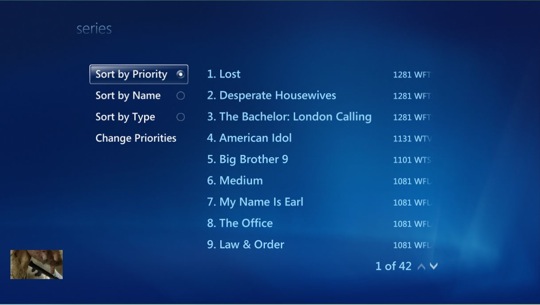
List of series recordings, no jokes about my wife’s favorite shows and yes they are higher priority than mine.

Scrub bar with total length, current position and time.
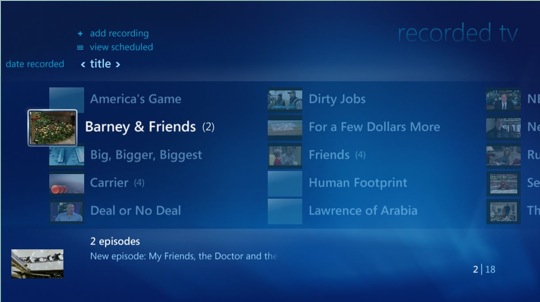
Shows I have recorded in the small view. The missing thumbnails are shows I transfered from my Series3. The samll window in the bottom is currently playing and in this case is playing a recording.
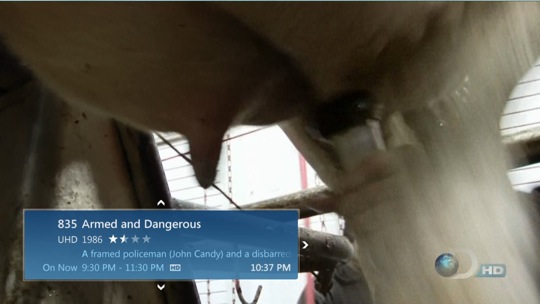
This mini guide can be viewed during Live TV or when watching a recorded program, and can be navigated by using the arrow keys.
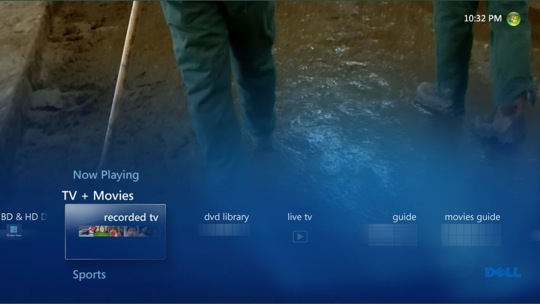
Here I’m accessing the main menu while watching a recorded program.
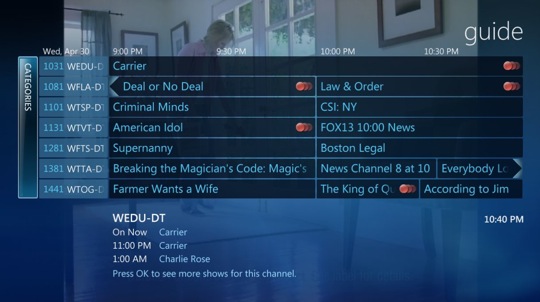
Viewing the transparent guide while watching a previously recorded program — no it doesn’t force you to Live TV like TiVo. It is very easy to see my series recordings with the multiple red circles, if there were conflicts, there’d be an ! mark on the show.
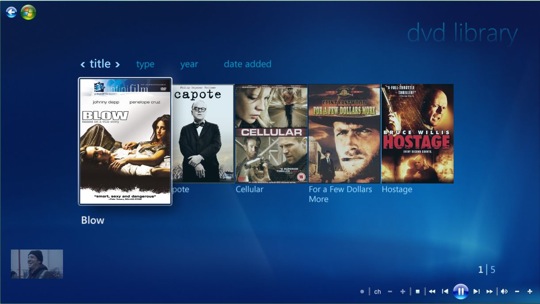
This is the option DVD Library feature that shows my ripped DVDs and recorded movies. You can also see the show continuing to play in the small windows on the bottom left.
One CableCARD problem down, one to go
Tuesday, April 22nd, 2008I sure hope Microsoft sends Ed Bott a nice Christmas card ’cause once again he’s helped out a fellow blogger on their quest to making Vista work. He left a comment in my original post, that helped me realize that configuring Vista’s Power setting to never turn off my display was a bad idea, because our favorite feature (HDCP) would break the output when it failed to handshake with a device that is off. So I set the Power settings to turn off the display after 5 minutes which makes the ATI driver stop trying to do the HDCP handshake when my Plasma is off. So now when I get up in the morning I’m staring at a black screen.
Unfortunately this isn’t my only problem. My ATI CableCARD tuner isn’t always working properly. Eventually it starts to macroblock very badly and sometimes even the entire screen turns green and freezes. I’ve found that the cure is to shut down the PC, unplug the ATI tuner for 30 seconds, plug it back in until the cable light turns green and then turn the XPS 420 back on. This buys me about one to eight hours of trouble free operation before the problem comes back. It starts out bearable, but then gets completely unwatchable, all the while the ATSC tuners continue to work perfectly.
After finding this helpful Microsoft page, I called Verizon and asked them to send my tuner an “init” and after a few minutes on the phone the helpful rep confirmed that my CableCARD tuner was communicating properly with their network and was everything was good to go as far as they were concerned. This ‘init’ made my tuner work perfectly again too, but by the time I got home the issue was back. Later that evening I was chatting with a friend who reminded me that when you buy an XPS system the support staff is in the US. So I gave them a call and although I don’t feel like they did a very thorough job of troubleshooting, they offered to send me a replacement. Unfortunately they said I had to call another department with my case number to get it, and you guessed it, that department was closed.
Although I don’t have much faith that a replacement tuner is the answer, I don’t have a better idea, so we’ll see how that goes, I just hope it doesn’t take another three weeks to receive it.
**Update** I received the replacement and it works perfect!
My CableCARD tuner is causing me lots of grief
Monday, April 21st, 2008It started off bad because it took me a few hours before I could even get the tuner added to my setup, but after I got it working, I thought I everything was cool and wrote up a nice little post about it. At the time everything did seem cool except the occasion drop out, which I assumed I could fix by checking my coax connections etc. But since then, not only has the occasion drop out not gone away despite spending a few hours messing with my connections — the same exact connections that work perfectly with a Series3 TiVo — but every single morning since I woken up to a system that is not operational. Then even after I remotely kill the process, I still have to reboot the system and the ATI CableCARD tuner to make the signal watchable.
First some background, skip this paragraph if you want to go straight to the problem. I’ve had a Series3 Tivo since the day they were announced and have had it working with two different providers using both SA and Moto CableCARDs. I’ve had a total of 10 CableCARD tuners installed without ANY issues and the wiring in my house is brand new. Speaking of the coax, it’s all high grade RG6, with good splitters (there are only two) and I use compression fittings.
When I removed one of my Series3 TiVos to replace it with the ATI CableCARD tuner, I took the exact same coax cable and CableCARD that has been serving me well without any issues for 14 months and used them for the ATI tuner. So I’m pretty confident that I don’t have a bad CableCARD or a signal problem. But just in case I tried both CableCARDs from my TiVo and double checked all my coax connections. I even hooked up an old attenuator that I used to use on my old HR10 TiVo, which only made things worse, so I don’t think the signal is too hot.
Anyways, on to the issue. I originally posted this at The Green Button, but since no one has really responded, I’ll try again here before throwing the thing out the window. Ever since I installed my CableCARD tuner every morning when I turn the TV on after being off all night, there is a just a black screen (TV indicates it’s receiving a 1080p signal). If I hit the buttons on the remote, I can hear the sounds and the extenders continue to work fine, but if I get out the mouse and keyboard I can’t see the cursor and it doesn’t seem to respond to any keyboard presses (not even ctrl+at+delete or ctrl+shift+esc). If I telnet in and kill ehshell.exe, it returns me to my desktop, then I re-launch VMC that then works properly, except all the CableCARD channels (ATSC channels are fine) have unwatchable pixelation (yes I checked every channel I watch, about 20). If I reboot and unplug the ATI CableCARD tuner for a second, then all the channels work fine — aside from the occasional drop out.
In the System log, I see this event every 2 seconds from some time after I turned off the display, until the time I killed ehshell.exe.
Log Name: System
Source: atikmdag
Date: 4/20/2008 9:06:46 AM
Event ID: 52233
Task Category: CPLIB
Level: Error
Keywords: Classic
User: N/A
Computer: VMC1
Description:
CPLIB :: General – Failed to authenticate output protection
My setup is pretty much a out of the box Dell XPS 420.
Intel Q6600 quad core.
3GB Ram
500GB SATA HDD
ATI Radeon HD3650 via HDMI @ 1080p60 (tried both Catalyst 8.3 and 8.4)
Pioneer PDP-6010FD
1 ATI CableCARD tuner
1 VBox PCI ATSC tuner
1 HDHomeRun dual ATSC tuner.
Since this is obviously completely unacceptable, if I can’t get it resolved, no matter how much I enjoy the VMC UI and extender architecture, I’ll just have to go back to using my TiVos.
**Update** The issue was resolved by setting Windows Power Setting to turn off the display after 5 minutes, even though Windows isn’t capable of turning off the display this appears to tell the ATI driver to stop trying to verify the HDCP handshake.
The CableCARD tuner is up and running
Thursday, April 17th, 2008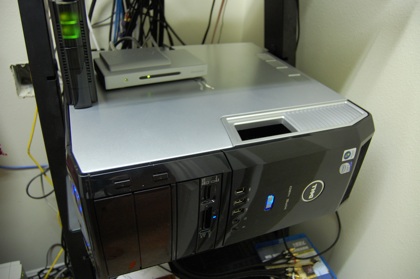
DHL delivered my ATI CableCARD tuner about 3:30 this afternoon, so it was hard to be productive at work knowing I had a new new toy at home and to make matters worse, I had to stay late due to some issues. After I got home it took me about 45 minutes to unpack the tuner, plug it in, check the firmware version and configure VMC to use it. It wasn’t the most straight forward configuration and when I was all done, it didn’t work. The video was more blocks than video. So later I went back to it and proceeded to monkey around with it for an hour or so until I finally got it working.
Here’s the interesting part. I used one of the CableCARDs from my wife’s TiVo, which was activated on the TiVo. And what do you know, it works fine. No I didn’t re-pair, and no I don’t understand why it works. I got the idea because the last time I paid $50 to RMA my Wife’s Series3 — happened twice in 14 months — I didn’t have to re-pair the CableCARDs.
Now that it is working, it’s working great. Channel changing isn’t as fast as I would’ve wanted, but it’s about the same as the Series3. The good part is that the VMC mini-guide makes it easier to channel surf.
As for TiVo vs VMC, I have a full post coming, but rest assured VMC is better, but requires quite an investment in time to set things up.
The quest for the best Media Center Extender
Thursday, April 17th, 2008Since it appears that no one really knows which is the best Media Center Extender, I’ll have to figure it out myself. This is a good thing, as I really like doing this type of thing.
As hard as I tried yesterday, I wasn’t able to order a D-Link DSM-750 for less than $300 yesterday, and after learning that my local Circuit City had the Linksys DMA2100 in stock for $249, I went ahead and picked one up. At the same time, I got an email from a representative of D-Link who’d saw my post yesterday and offered to send me a DSM-750 for review! So once I get it, I plan to rent an Xbox 360 and do a full head to head review for Engadget HD. But in the meantime, here’s my initial impressions of the Linksys.
Setup was easy — although it did take like 5 tries before it’d link up with VMC — but despite the unit being about 15 feet from my 802.11G AP and without any walls in the way, the network tuner indicated I didn’t have enough throughput for HD. So I found a patch cable and used the CAT5 drop I already had behind the TV. The remote isn’t nearly as bad as Chris L lead me to believe it was, but programming was really weird — love the fact the vol, mute and pwr is programmable though– and the LiveTV, RecordedTV etc, buttons on the top are a little on the small side. The UI is very responsive and down right fast, but I’m surprised how drab it looks without the animations etc. Overall I have to say Microsoft did a great job — yeah, I said it — integrating the extenders. I’m very impressed with the experience and the tuner conflict resolution, as well as the way the two TVs don’t step on each other. Nice job guys. The box is completely silent and the remote does work good; in fact my only hardware complaint is the super bright blue led, that actually woke me out of bed in the middle of the night in search of some black tape to cover it with.
To give you an idea of how well this thing worked out of the box is that I actually set it up in about 30 minutes and my wife was watching her shows on it the same night. And just like most others, my wife is my toughest user. I should have the final part today as I expect my CableCARD tuner, so my migration from TiVo to VMC is nearly completion.
What’s the best Media Center Extender?
Wednesday, April 16th, 2008With my CableCARD tuner coming tomorrow, I’m packing up one of my Series3 TiVos to sell, and I’m looking for a Media Center Extender. All three options are about the same price, but right now I’m leaning towards the D-Link DSM-750 even though it’s the most expensive at $315. But I’m tempted to save some money and pick up the Linksys DMA2100 for $250, but Chris L’s review has me thinking twice. The real problem is that no one has reviewed the D-Link. The Xbox 360 is $300 after you buy a remote, and although I understand it makes a great extender and also plays games, I’ve had one and the noise really bothered me. Plus I hear the IR receiver on it is troublesome.
