My electronics in pictures » My remote
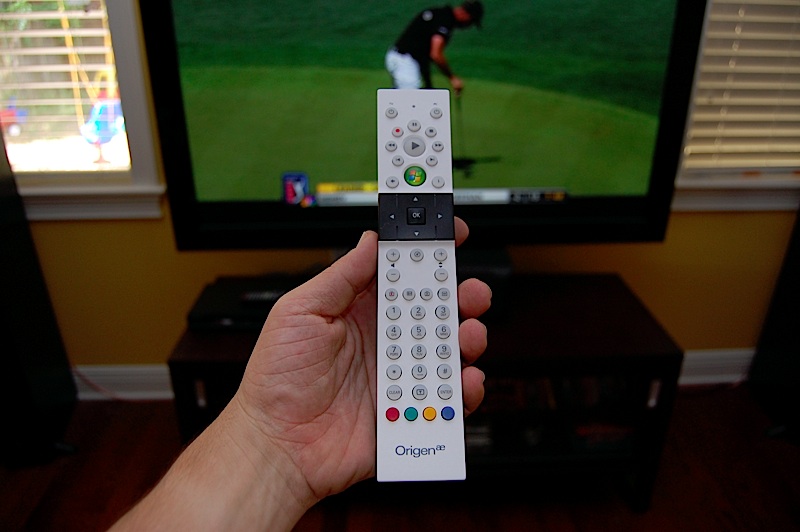
I have this same remote in every room. It will work everywhere, but the TV power and volume is obviously specific. But since both bedrooms have Sharp TVs, they are interchangeable.
I have this same remote in every room. It will work everywhere, but the TV power and volume is obviously specific. But since both bedrooms have Sharp TVs, they are interchangeable.
Where did you buy these remotes from? It seems like there is only one place selling them in US and they want way to match money for shipping…
I bought it from PCAlchemy, but they are out of business now. But they used to sell them for $17 plus shipping so they were just over $20.
Just to confirm, this remote will work with either X360 and MC? Do you require the OrigenAE IR modules, or will this work with “any” Vista MC compliant IR hardware. I am looking at replacing my dated “offical” MS MC Remote.
Thanks
Yes it will work with any Media Center IR receiver or extender. It supports the nine codes and has programable TV pwr, Mute and volume buttons.
Hi Ben,
Can you confirm your OrigenAE remote can reprogram the mute button? I have configured both TV and Volume buttons, but the mute won’t learn.
BTW this remote is gorgeous!
Thanks
Yes I’ve programmed the mute button on it for all three of my rooms.
Just to cure my insanity. So the proceedure for re-programming the “Mute” button is no different than the other buttons?
Yes that is correct, the mute works the same way as volume.
Remote looks awesome! Found one on eBay for around $20 after shipping, but I don’t have an IR receiver (no Xbox either). Anybody know where I can get a cheap IR receiver?
Can this control the volume for an av receiver?
Yes, it can learn just about any code for mute, TV pwr and volume.
Can it also power an a/v receiver on and off?
This from Dell looks pretty similar but missing a few buttons: http://accessories.us.dell.com/sna/productdetail.aspx?c=us&cs=04&l=en&s=bpi&sku=412-0991&~lt=print
No, only the TV and the PC.
It is actually a phillips remote and there are a few versions of it.
Ben,
It would appear someone else has the same problem as me — “Mute” button cannot be reprogrammed. The mute works fine with my PC, unfortunately I was hoping to reprogram the Mute to control my amp — similar to the vol +/-.
Any others with the same problem?
http://thegreenbutton.com/forums/p/56402/416755.aspx#416755
PJ,
Yes, it works fine on my AVR, but not on my TV in my bedroom.
I like the look of that remote, and it looks like I can pick one up from http://www.shop.perfecthometheater.com, however it looks like it is just the remote, not the IR reciever also. My system is completely DIY and my current remote is RF so I don’t have an existing MC IR reciever, do you know where one could pick-up just the IR Reciever?
That site also sells IR receivers, but you can buy them bundled with remotes other places. I only paid $16 for that remote, but pcalchamy has long since been out of business.
So basically I need an RC6 compatible receiver?
So i picked one of these bad larry’s up, but there is no manual and google was unable to provide any further assistance, do you remember how program the power/volume buttons?
It is the same on every Media Center remote.
http://eirikso.com/2005/11/16/how-to-program-the-buttons-on-your-mce-remote/
Thanks so much, my existing remote is RF and has no programmable buttons.
I just wish these remotes had an extra programmable button, ideally for learning the AV input button on my remote.
Any who, thanks again, and keep up all the good work.