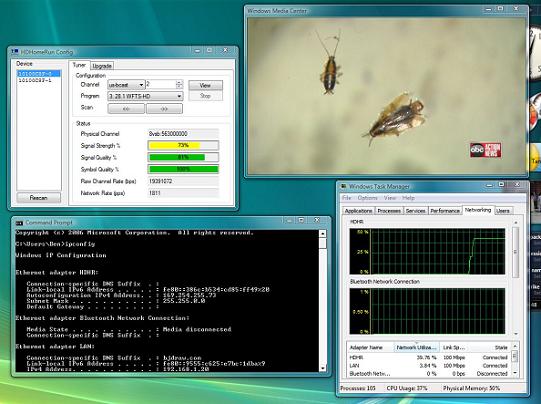
I’ve loved my HDHomeRun for as long as the product has been on the market, but never really used it heavily until I switched to Media Center about a year ago. Well ever since, from time to time I’ve experienced network issues that have caused less than perfect picture quality — drop outs, blocking, breakups etc. I’ve spent countless hours troubleshooting this and most of the time it ended up being the driver for my Intel 82566DC-2 network adapter. At one point I even spent some money to replace my switch since the NIC refused to auto-negotiate to 100/full with the 16 port Netgear switch I was using. Well for whatever reason the issues came back over the weekend and I finally threw in the towel and did what I should’ve done a long time a go.
The simple solution
I went down to CompUSA — yes they still have them in Tampa — and picked up a $14 NIC. I threw it into a spare PCI slot (you can use a USB NIC if you want) and plugged the HDHR directly into it. The cool thing is that I didn’t even need a crossover cable, in fact all I had to do was rerun the HDHR setup utility to rediscover the location of the device. And thanks to the beauty of APIPA — you know that 169.254.x.x address — I didn’t even have to set an IP on the NIC or configure an IP for the HDHR.
Now my picture quality is back to the perfect and my only regret is that I didn’t just break down and do this earlier. So if you are having problems with your HDHomeRun, I wouldn’t hesitate to throw an extra NIC in your PC and at the very least isolate the problem.
Ben,
I didn’t know that you could run it direct like that! Thanks for the tip. I will definitely share this with a few friends.
– Andres
Honestly I didn’t know it either until I tried it. I got the idea because all the newer tuners work this way. I don’t think most realize that even the new CableCARD tuners are just USB Network devices as far as Windows is concerned.
I was having the same issues and I ended up completely removing the HD HR and just used my PCI/PCIe tuners.
When I was having issues I did the same thing swapped out switches, adjusted network settings. I even went out and picked up some intel Pro network 1000 GT cards and that didn’t work.
but again never thought of directly connecting it as well. So now that I have the intel nic and still have the built in mobo nic I will give this a try.
– Josh
I knew you could do it, but never had to, just lucky with my network I guess…
But I didn’t think it was so easy, when I switch to Win7 I’ll be doing this…
I have been having some network issues with my HDHR which I bought to use on my Windows 7 beta machine. I thought my problems were because the HDHR was far from my PC on the network but I may have to give this a shot.
That’s what I have been doing since I added the HDHR over a year ago. Makes things a whole lot better.
Thanks for the info on this. Did you use a 10/100 NIC? Or is there any value to going with a Gig NIC card?
The HDHR has a 100Mbps NIC, so a Gig Nic isn’t going to be any better than a 10/100.
I’m sure you’re well past using HDHomerun Prime & Windows Media Center on the Windows 7 platform but how did you connect the HDHomerun directly to the NIC card without connecting the PC to the network or is it a 2nd NIC card within the PC? One for the network and the other for the PRIME? Do you have any images?
My Windows 7 system clicks uncontrollably just before the firmware update was issued to my HDHomerun Prime all of a sudden. The remote can’t control it when the clicking starts but only occurs on the HD and popular channels. On the music only channels theirs virtually no clicking. The clicking may be a separate issue but now I can’t full screen the image without the PC going dark and a better picture could solve my problems. Thanks.
I think the clicking is a different issue. But yeah, I added another NIC to the HTPC and connected the Prime directly to it via a CAT5 cable.